



Maisonroll Login
Maisonroll login requires a registered email address and a password. Users can reach the account dashboard within seconds. The dashboard has the wallet and bonus tracker. You can always know everything about your activity history and security settings in one place.
An account is the starting point for everything on the platform. Real-money play, promotions, payments, and tournaments all sit behind the profile, so this page explains how to create one, how to sign in, and what the verification process looks like at Maisonroll Casino.



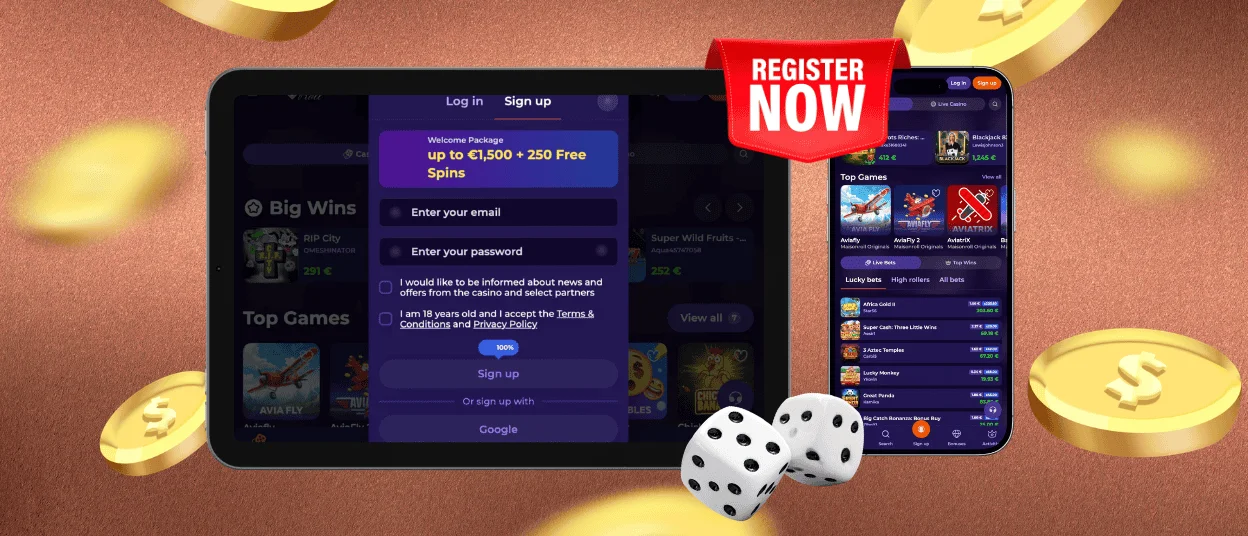
How to Register at Maisonroll Casino
Registration takes around two minutes and asks for basic details only. Members who are 18 or older can open a profile through the following steps:
- Visit our website and click the “Sign Up” button in the top corner.
- Enter your email address and set a password with letters and numbers.
- Confirm the Terms and Conditions checkbox and submit the form.
- Add your full name, date of birth, and phone number in the next window.
- Save the details to activate the profile.
The account works immediately, and no separate mobile registration exists. One profile covers the desktop site, mobile browsers, and the app. After the first deposit, new members can claim the welcome package. Missions become available from day one — even a simple task such as email confirmation brings a small reward.
How Do You Log In to Your Account?
To complete the Maison Roll login, press the “Log In” button on the homepage, type the email and password from registration and confirm the entry. The balance appears at the top of the dashboard right after sign-in. A confirmation code may arrive by email when the platform detects a new device.
That extra code protects the balance from strangers and takes under a minute to enter. Sessions on a phone and a computer can run in parallel, and the balance with active bonuses syncs between them in real time.
If you forget your password, use the recovery link under the Maisonroll login form. A reset message reaches the registered inbox within a minute, and the new password applies to every device at once. Accounts locked after several failed attempts can be restored through live chat, where the support team verifies identity manually.
What Opens Up After the Maisonroll Login?
The dashboard gathers the main account tools on one screen, so members rarely need to move between sections. Here is what you can find inside:
- Wallet with deposit and withdrawal buttons, plus real and bonus funds shown separately;
- Favorites area where players pin the games they return to most often;
- History of sessions and transactions with timestamps for spending control;
- Bonus tracker with active offers and wagering progress;
- Security tab for password changes, two-factor authentication, and session review;
- Limits section with deposit caps, loss caps, and session timers.
Saved payment methods deserve early attention, because stored details speed up every future deposit. Responsible gaming limits apply once and then carry across all devices automatically. The mobile layout mirrors the desktop version, which keeps navigation familiar on any screen.
Maisonroll Account Verification
Verification runs once, before the first withdrawal. The check confirms that each profile belongs to one real person and protects funds from unauthorized access. Users upload documents through the profile, and the compliance team completes the review within 24–48 hours. Clear photos shorten the waiting time, so image quality is worth checking before submission.
| Fase di verifica | Documenti accettati |
| Conferma dell’identità | Passaporto, carta d’identità o patente di guida |
| Conferma dell’indirizzo | Bolletta o estratto conto bancario emesso negli ultimi tre mesi |
| Conferma del pagamento | Foto della carta bancaria o uno screenshot del conto del portafoglio elettronico |
Una volta completata la verifica, viene inviata un’e-mail di conferma e il profilo ottiene pieno accesso alle operazioni di prelievo. Non è necessario inviare nuovamente la richiesta per i pagamenti successivi. I membri verificati di Maison Roll beneficiano inoltre di limiti di prelievo più elevati man mano che il loro livello di fedeltà aumenta.
In che modo Maisonroll protegge il tuo account?
Ogni profilo è protetto da diversi livelli di difesa. I protocolli TLS 1.3 con crittografia a 256 bit proteggono ogni sessione e i dati personali vengono gestiti secondo gli standard del GDPR. Nella scheda “Sicurezza”, i giocatori possono gestire autonomamente gli altri strumenti. L’autenticazione a due fattori aggiunge un codice monouso a ogni nuovo accesso e si attiva con un paio di clic. La stessa scheda elenca le sessioni attive con i tipi di dispositivo, gli orari di accesso e gli indirizzi IP, in modo che gli accessi non riconosciuti saltino immediatamente all’occhio. Un pulsante di disconnessione remota chiude contemporaneamente tutte le sessioni su ogni dispositivo.
Il team di assistenza risponde alle domande relative alla sicurezza 24 ore su 24. Le risposte tramite chat live arrivano entro un minuto e l’assistenza multilingue consente agli utenti di descrivere un problema nella lingua che preferiscono. L’assistenza via e-mail gestisce i casi più complessi, fornendo risposte dettagliate solitamente entro un giorno.
Domande frequenti
Posso usare lo stesso account sia sul cellulare che sul computer?
Sì. Le credenziali di accesso a Maison Roll sono le stesse sia nell’app, sia nei browser mobili, sia su PC. Le impostazioni e i bonus attivi vengono trasferiti automaticamente, quindi non è necessaria alcuna registrazione separata per nessun dispositivo.
L’autenticazione a due fattori è disponibile su Maisonroll?
Ogni utente può attivare gratuitamente l’autenticazione a due fattori (2FA) nelle impostazioni di sicurezza. Una volta attivata, la protezione rimane attiva finché non la si disattiva, e i codici monouso vengono inviati immediatamente, garantendo così un processo di accesso rapido.
Posso modificare in un secondo momento il mio indirizzo e-mail registrato?
Sì. Apri la sezione dei dati personali nella dashboard e inserisci il nuovo indirizzo. La piattaforma potrebbe richiedere una conferma dell’identità prima che la modifica venga applicata, al fine di proteggere il profilo da modifiche non autorizzate.
Cosa devo fare se il mio account Maisonroll viene bloccato?
Attendi qualche istante dopo diversi tentativi falliti oppure contatta direttamente la chat live. Il nostro responsabile dell’assistenza verificherà la tua identità e ripristinerà l’accesso senza un lungo timeout automatico.


